

PapEye Print Uniformity · print quality software
Measure print uniformity from a flatbed scan
For printing, print development and paper or ink evaluation. PapEye Print Uniformity measures mottling, graininess and banding in scanned print samples, with methods based on ISO/IEC 24790. One analysis region gives all three numbers.
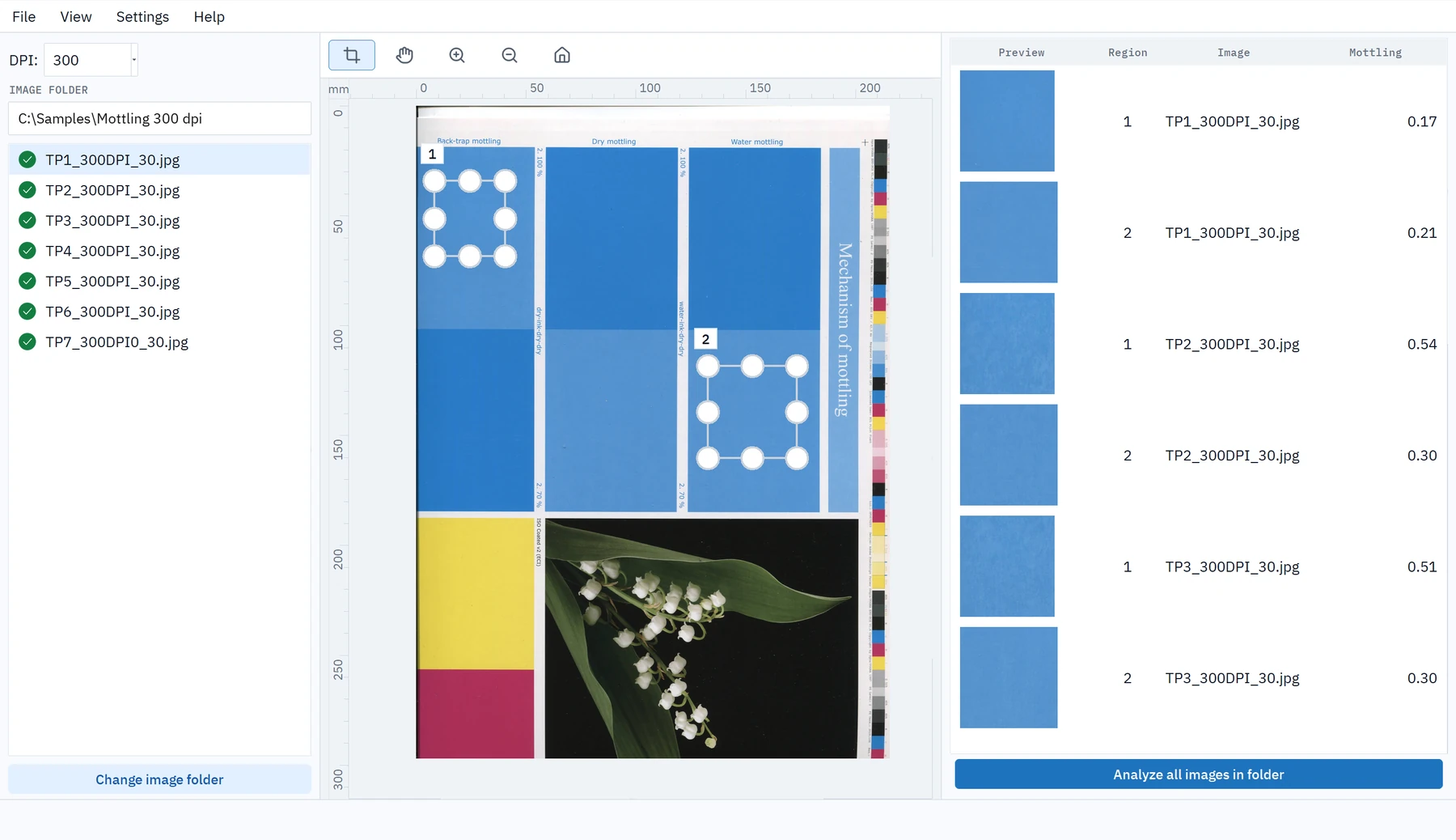
One of three PapEye applications for scanned samples. Measuring printed lines and text? See PapEye Line Quality. Counting dirt in pulp, paper or board? See PapEye Dirt Count, which needs no print.
What it measures
PapEye Print Uniformity measures the unevenness of a printed tone from an ordinary flatbed scan and gives each sample a number. It replaces the earlier separate PapEye Mottling and PapEye Graininess products and adds banding.
- Mottling is blotchy, cloud-like unevenness of a printed tone, patches of a few millimeters and up, usually from uneven ink absorption or coating.
- Graininess is the same kind of unevenness at a much finer scale, a sandy texture below about a millimeter, from screening, ink film break-up or the base sheet.
- Banding is periodic: light and dark stripes across the print at a regular spacing, from a cylinder, roller or feed step of the press or printer.
Unevenness at different scales looks different to the eye, so the three measures look at three scales.
| Measure | What it detects | Typical causes | Minimum region | Minimum scan resolution |
|---|---|---|---|---|
| Mottling | Blotches a few millimeters across, and similar marbling | Uneven ink absorption, coating variation, back-trap mottle | 25.4 × 25.4 mm | 300 DPI |
| Graininess | Fine texture below about one millimeter | Screening, ink film break-up, base sheet formation | 12.7 × 12.7 mm | 1200 DPI |
| Banding | Periodic stripes across the printed sheet | Cylinder, roller and feed-step periodicity in the press or printer | 150 mm across × 100 mm down | 600 DPI |
When a region or a scan does not meet a measure's requirements, PapEye shows a dash for that measure instead of an unreliable value.
How the analysis works
- 01
Scan
Scan the printed samples on a flatbed scanner and save the images into one folder. At 1200 DPI you get all three measures.
- 02
Draw the regions
Draw the analysis regions on one scan and apply the same regions to every similar sample in the folder. For each measure, PapEye filters the region to a band of spatial frequencies, trims the margins, divides the area into tiles and calculates the result from the variation between the tiles.
- 03
Compare and export
Mottling, graininess and banding appear side by side for every region. Export the whole folder to CSV to compare production runs, suppliers or trial points.
What the samples need to be
For printed and white-top samples.
PapEye Print Uniformity measures colour variation over an area, so the sample is a printed area of one nominal tone: a solid or halftone patch from a print trial, a proof or a production sheet. The same measurement works on unprinted white-top liner and coated board, where the variation of the surface itself is measured as white-top mottling.
- Mottling can be measured at 300 DPI. Graininess needs 1200 DPI, banding 600 DPI or more.
- Scan every sample of one comparison with the same scanner and the same settings, into one folder.
- Draw the region on one scan and apply it to the folder; the values for every sample come out as one table, exportable to CSV.
- Compare absolute values only between samples scanned with the same scanner, resolution, settings and calibration.


The printed samples above show how a print with more visible variation has a higher mottling value.
The scanner–autofeed-software combination has worked extremely well in measuring mottling. It is definitely the smartest way to carry out measurements, since there’s no need to open the scanner and change the sample after every sheet, whether you’re dealing with single sheets or 20 sheets.
How mottling and graininess are calculated
The eye hardly notices very fine variation, but it is sensitive to patches within a certain size range. Each measure therefore looks at one scale of unevenness, and both follow the same steps:
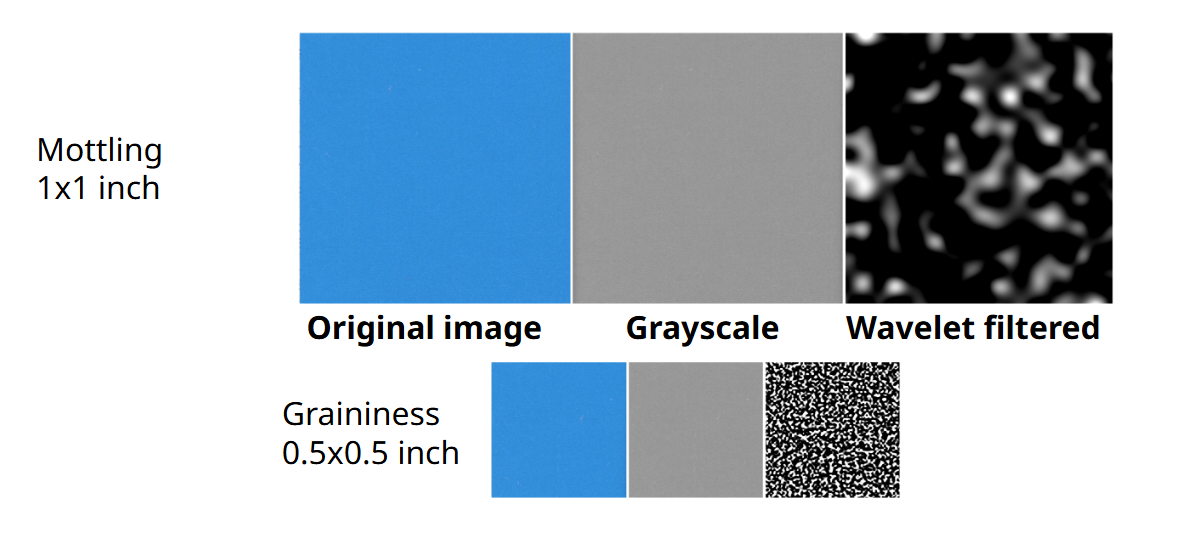
- Grayscale. The region is converted to a lightness image, so colour is measured as variation of reflectance.
- Band-pass filtering. A wavelet filter keeps only the spatial frequencies of the measure's scale, removing both the slow drift of the scanner and the sheet and the fine texture below the scale. Mottling keeps the coarse band, patches of a few millimeters across; graininess keeps a finer band that reaches about 1.5 cycles per millimeter, which is why it needs a 1200 DPI scan.
- Tiling and variation. The filtered image is divided into tiles of the measure's scale, mottling on a coarser grid than graininess, and the mean lightness of each tile is taken. The measure is the variation of those tile means, expressed relative to the mean lightness of the region, so a darker or lighter tone does not change it.
The values are on a relative scale: a region with no visible unevenness is close to zero, and a marbled print measures several times higher. The definitions of the measures are based on ISO/IEC 24790; the exact band limits and tile sizes are set in the application and shown with the result.
Scanner calibration
You do not need to calibrate the scanner for repeatable comparisons made with one scanner and the same settings. Without a calibration, PapEye assumes a standard sRGB response. To compare results between scanners or laboratories, calibrate the scanner's reflectance response (OECF): scan a certified grayscale target, and PapEye fits a response curve for each color channel and uses it for every later scan. Calibrations are stored by scanner name, so a laboratory with several scanners keeps one per instrument, and they can be exported to another PapEye installation. Resolution alone does not make a scan accurate: sharpness, tonal response and settings affect the results too.
Requirements and licensing
| Operating system | Windows, Linux |
|---|---|
| Installation | None: unzip the download and run the program |
| Scanner | A standard flatbed scanner; ask us for a list of recommended models |
| Image formats | PNG, JPEG, GIF, BMP and PDF (each page of a multi-page PDF separately) |
| Results | Mottling, graininess and banding per region; columns can be hidden on screen |
| Exports | CSV (semicolon-separated, opens in Excel), copy to clipboard, PNG thumbnails of each region, sample regions saved for reuse |
| Batch analysis | All images in a folder with the same sample regions |
| Command line | For scripted analysis of single images with saved sample regions |
| Method | Based on ISO/IEC 24790:2017 (not a certification of conformity) |
| License | A permanent license for one PC |
Each PapEye application has its own license, so a Line Quality or Dirt Count license does not unlock Print Uniformity, and neither do licenses for the earlier Mottling and Graininess products. To license it, ask us for a demo or a quote; when you first start PapEye it shows a Machine ID, which you send to us, and you save the license file you receive in the .papeye folder in your user folder.
FAQ
What is the difference between mottling and graininess?
The scale. Graininess measures fine texture below about one millimeter; mottling measures blotches several millimeters across. The calculation is the same, but ISO/IEC 24790 defines a different spatial frequency band and region size for each.
What does banding measure?
Banding is the periodic part of the unevenness: light and dark stripes across the printed area, typically from a cylinder, roller or feed step of the press or printer. Mottling and graininess describe random unevenness at two scales; banding picks out the repeating stripes and their spacing. Because it looks for a period, the region must be at least 150 mm across and 100 mm down, and the scan at least 600 DPI.
Why does banding show a dash for my sample?
Banding needs a nominally uniform area at least 150 mm across and 100 mm down, scanned at 600 DPI or more. Test patches are often smaller than that. Scan a larger uniform area to get a banding result.
Why does graininess show a dash at 600 DPI?
Graininess reaches about 1.5 cycles per millimeter. At a lower scan resolution you would be measuring the resampling of the image rather than the print, so PapEye requires 1200 DPI for graininess.
Does the region have to be square?
For mottling and graininess, no: the region must meet the minimum size in both directions, and the result is the average over the rectangle. For banding the directions matter. The profile runs across the sheet and is averaged down it, so the 150 mm minimum is horizontal.
Can I hide measurements I do not use?
Yes, in Settings → Show results. This only changes the columns on screen. Every measure whose requirements are met is still calculated and included in the exports.
What scan resolution should I use?
For mottling alone, 300 DPI can be enough. For all three measures use 1200 DPI: ISO/IEC 24790 specifies it and graininess requires it; banding needs at least 600 DPI. Whatever you choose, scan every sample you want to compare at the same resolution and settings.
Can we use a sheet-fed scanner with an automatic feeder?
Yes, and some customers do exactly that for mottling. They scan batches of sheets at 300 DPI on an A3 sheet-fed scanner with a feeder, such as the Epson WorkForce DS-30000, which takes board as well as paper. Because the position of every sheet is known, the mottling values read as a profile across the web. Mottling is just as valid at 300 DPI; graininess and banding are not, so a feeder routine at that resolution is a mottling routine.
Can I analyze a whole folder at once?
Yes. PapEye applies the same regions to every image in the folder and exports the results for all of them to one CSV file. If your scanner feeds sheets automatically and saves into a folder, the new scans appear in PapEye's file list as they arrive.
Request a demo or quote
Tell us what you print and how you scan it.
You can also email info@tapiotechnologies.com.