
Count visible dirt specks automatically from folders of regular scanner images in minutes.
PapEye Dirt Count for Windows measures visible dirt and specks, particles and background extraneous marks from standard flatbed scanner images. It lists each defect, calculates size distribution, and exports results for reporting. Use a normal scanner, scan your sample, and PapEye finds and measures the dirt automatically. You get a clear list of defects, size metrics, and summary statistics which you can compare between runs and suppliers.
Using the software is very simple:
1. Scan any number of sample images with a 600 DPI scanner Obtain enough surface area so that there is a statistically significant number of dirts in the scanned set of images.
2. Open PapEye Dirt Count and select the folder containing the sample images.
3. After the software has detected the dirts, select or exclude the dirt specks of interest, review and export results (defect list + statistics summary)
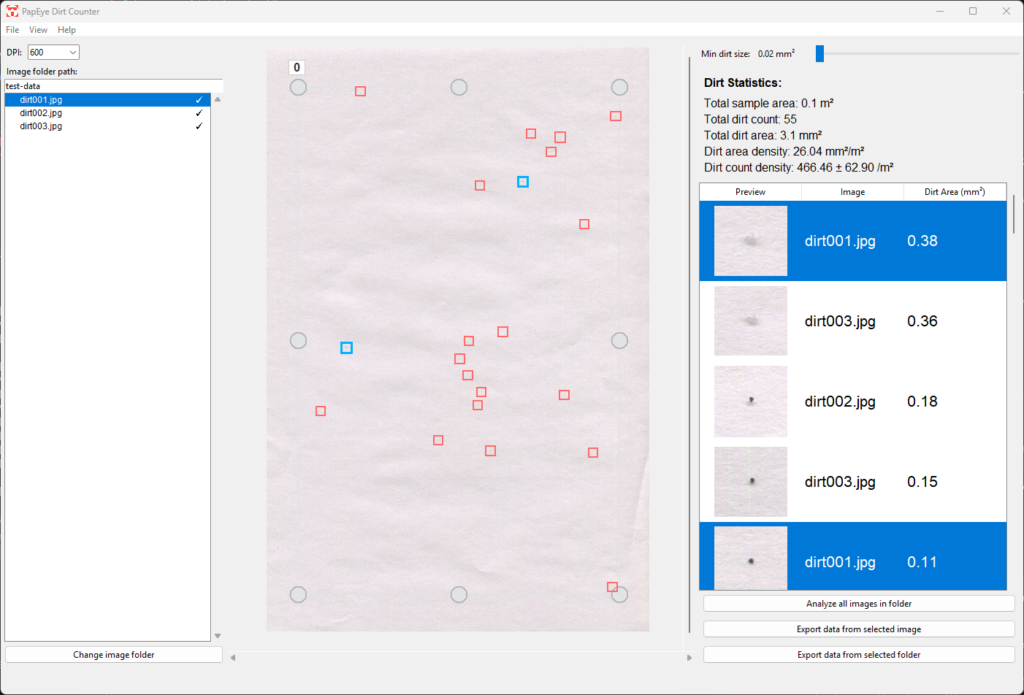
The software is a standalone executable and licenses are sold as a permanent license for a single PC. List of recommended scanners is available from Tapio Measurement Technologies.
A: If the dirt level is low, a larger scanned area is required to achieve sufficient statistical accuracy. This can be done by cutting the sample into multiple sheets and scanning them using a document scanner with an automatic feeder.
Q: Can the software classify dirts into categories?
A: Yes. Dirt specks can be excluded and included from the analysis built-in selection tools. Users can easily go through the list to classify dirts based on the visible close-up image of the dirt, the dirt area, or other properties.
Q: Does the software produce false positives?
A: Detection is based on colour contrast relative to the paper background. As with all dirt counting methods, non-dirt defects such as dust, fibres, or creases may occasionally be detected. The selection and cropping tools allow the user to quickly exclude such areas from the analysis.
Q: What scanner resolution is required?
A: A resolution of 600 DPI is required for reliable dirt detection. Lower resolutions reduce the minimum detectable speck size and may lead to underestimation of small defects.
Q: Does the software follow a TAPPI or ISO standard?
The algorithm has been developed in-house and does not directly correspond to a specific TAPPI or ISO dirt counting standard. It is intended for internal quality control, trend monitoring, and comparative analysis using consistent sampling and imaging conditions. When the same scanning setup and settings are used, results are highly repeatable and suitable for routine laboratory use.